Hands-on work across AWS, homelab infrastructure, networking, and automation. Each entry explains what I built, where it runs, and what I learned.
Cloud
The portfolio is itself a working cloud project, built to put AWS fundamentals into practice.
SyedSCerts AWS Serverless Portfolio
CLOUD · SERVERLESS
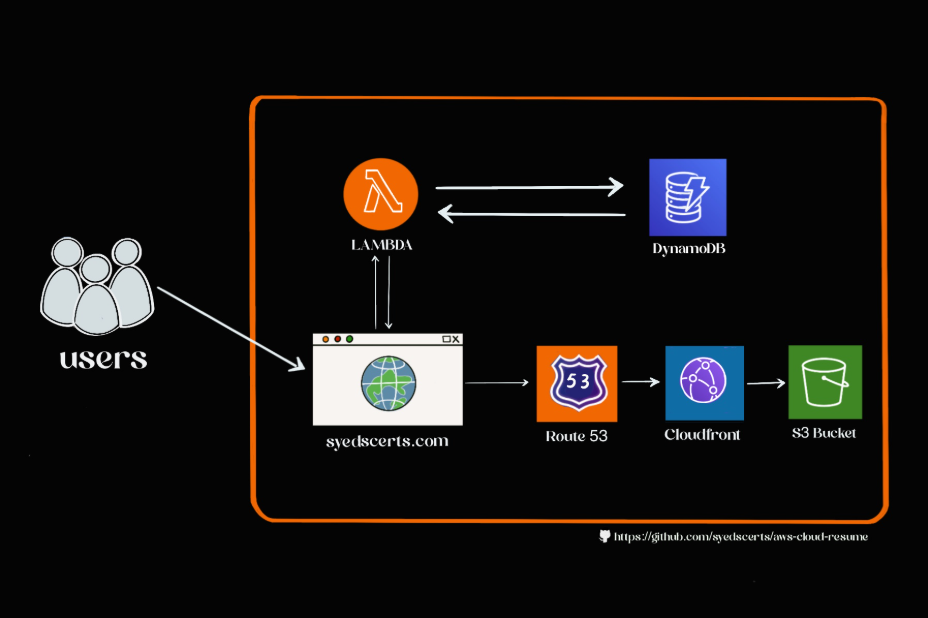
High-level architecture of my AWS-hosted portfolio project. Click to open the original.
Problem. I wanted to turn AWS certification learning into a real, public project and make a professional resume accessible online.
What I built. A static portfolio on Amazon S3, delivered through CloudFront over HTTPS with a custom Route 53 domain. A small JavaScript visitor counter calls the deployed Lambda Function URL, and Lambda returns the current count backed by DynamoDB.
ROUTE 53 DOMAIN→CLOUDFRONT HTTPS / CDN→S3 STATIC SITE
BROWSER COUNTER SCRIPT→LAMBDA FUNCTION URL→DYNAMODB COUNTER
Infrastructure and deployment
The existing project is described as using AWS SAM, GitHub Actions, Python, and JavaScript. The original SAM template and Actions workflow were not present in the workspace I audited, so their exact current configuration still needs to be reconnected and reviewed.
What I learned
How a custom domain, CDN, HTTPS certificate, and static S3 origin fit together.
How a browser-facing counter can connect to a serverless backend.
How to make infrastructure and deployment repeatable rather than relying only on console changes.
The currently deployed frontend calls a Lambda Function URL directly. Confirm whether API Gateway is still part of the deployed path before adding it to the architecture.
Homelab infrastructure
A Lenovo Tiny Proxmox host and Raspberry Pi run services that I use, learn from, and improve over time.
Proxmox Homelab
HOMELAB · VIRTUALIZATION
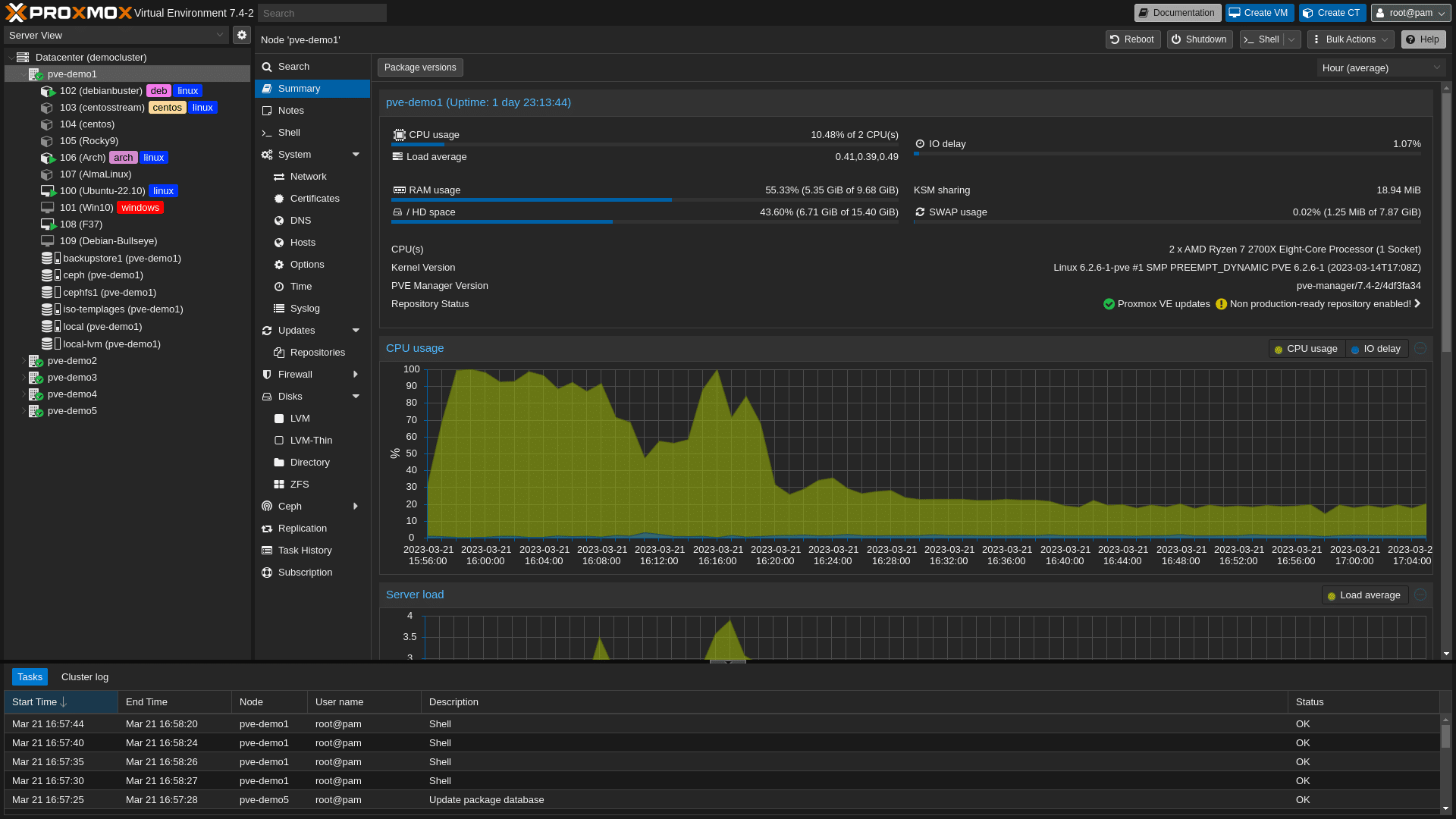
Proxmox node summary and workload graphs. Click to open the original.
Goal. Keep a small, always-available environment for virtualization, Linux, containers, storage, network services, and self-hosted applications.
What’s running. Lenovo Tiny mini PC with a six-core Intel i5, 16 GB RAM, 256 GB internal SSD, plus a Samsung 1 TB external SSD. Proxmox hosts Immich, Jellyfin, Docker containers, and planned future virtual machines.
What I’m learning. Resource planning, persistent storage, service networking, backups, Linux operations, and keeping the services I use available.
What I built. Migrated approximately 255 GB of personal photos and videos into Immich running in the Proxmox homelab.
What it involved. Moving a substantial personal media library into self-hosted infrastructure while keeping the service, data, and storage together.
What I learned
Plan data migration before moving a large library.
Understand persistent volumes, storage capacity, and where application data lives.
Consider backups and recovery before relying on a self-hosted archive.
ImmichProxmoxDockerLinuxPersistent Storage
Jellyfin Media Server
HOMELAB · SELF-HOSTED
Jellyfin runs in my Proxmox environment as a self-hosted media server. The project gives me a practical place to work with Linux services, storage, containerization, and home network access.
Areas exercised
Run a persistent application inside the homelab.
Connect a service to its media storage and client devices.
Keep local services reachable and monitored.
JellyfinProxmoxLinuxContainersStorage
Uptime Kuma + Discord Alerts
HOMELAB · MONITORING
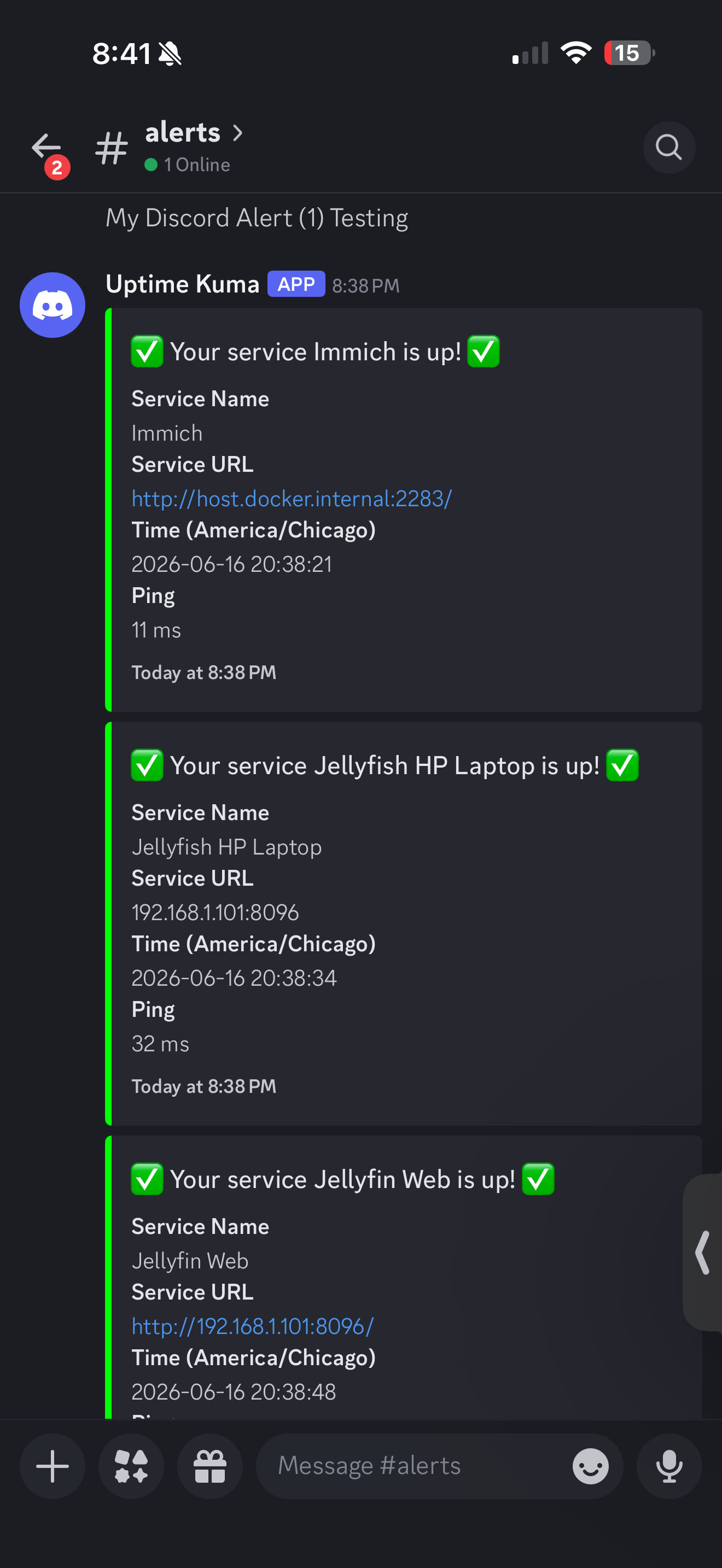
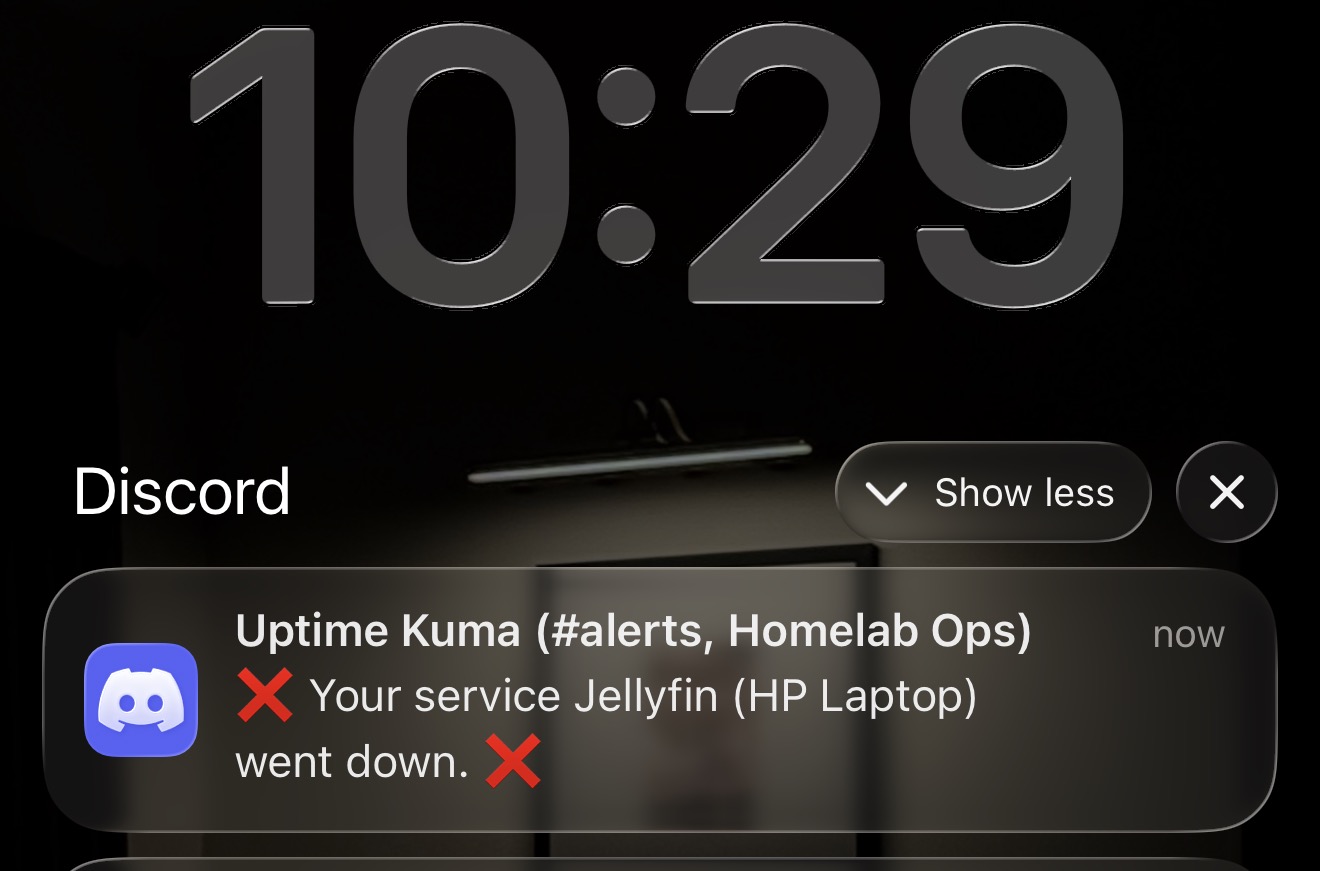
Self-hosted uptime monitoring for services in my lab. I configured Discord notifications so I know when monitored services become unavailable and when they recover.
Recovery notification: Immich is up.Outage notification: Jellyfin went down.
What I learned
Monitor service availability rather than assuming a service is healthy.
Use alerts to reduce the time between an outage and noticing it.
Keep monitoring separate enough to help diagnose the service being watched.
Uptime KumaDiscordRaspberry PiMonitoring
Pi-hole DNS Project
NETWORKING · HOMELAB
Pi-hole provides network-level DNS filtering in my home environment. I use it selectively for devices and have experimented with DNS and DHCP configurations; the main router currently handles DHCP.
What I learned
DNS changes affect every client differently, so test device by device and keep a clear path to revert network settings.
Pi-holeDNSDHCPRaspberry Pi
Homelab Network + Rack Build
NETWORKING · HARDWARE
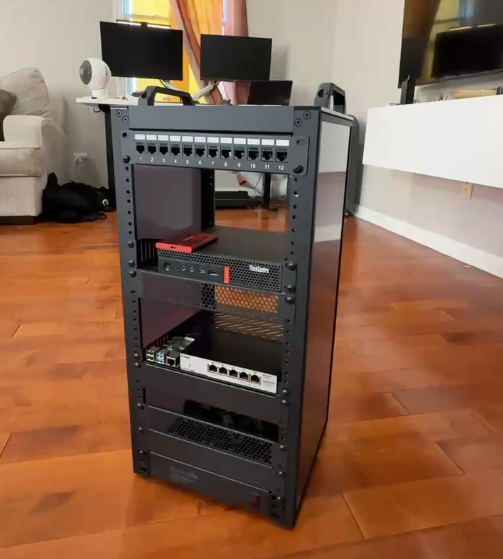
The physical rack build and network gear.
A compact 10-inch rack build for the lab: managed and unmanaged switches, patch panel, Cat6 keystones, short patch leads, cable management, rack PDU, Lenovo Tiny host, Raspberry Pi, and external storage. Some parts were purchased used.
The home network is consolidated on 192.168.1.0/24. The diagram on the homelab page is a high-level map; it does not imply specific switch ports or cabling that haven’t been documented.
Small scripts can make an always-on homelab useful every day.
Morning Motivation Bot
AUTOMATION · PYTHON
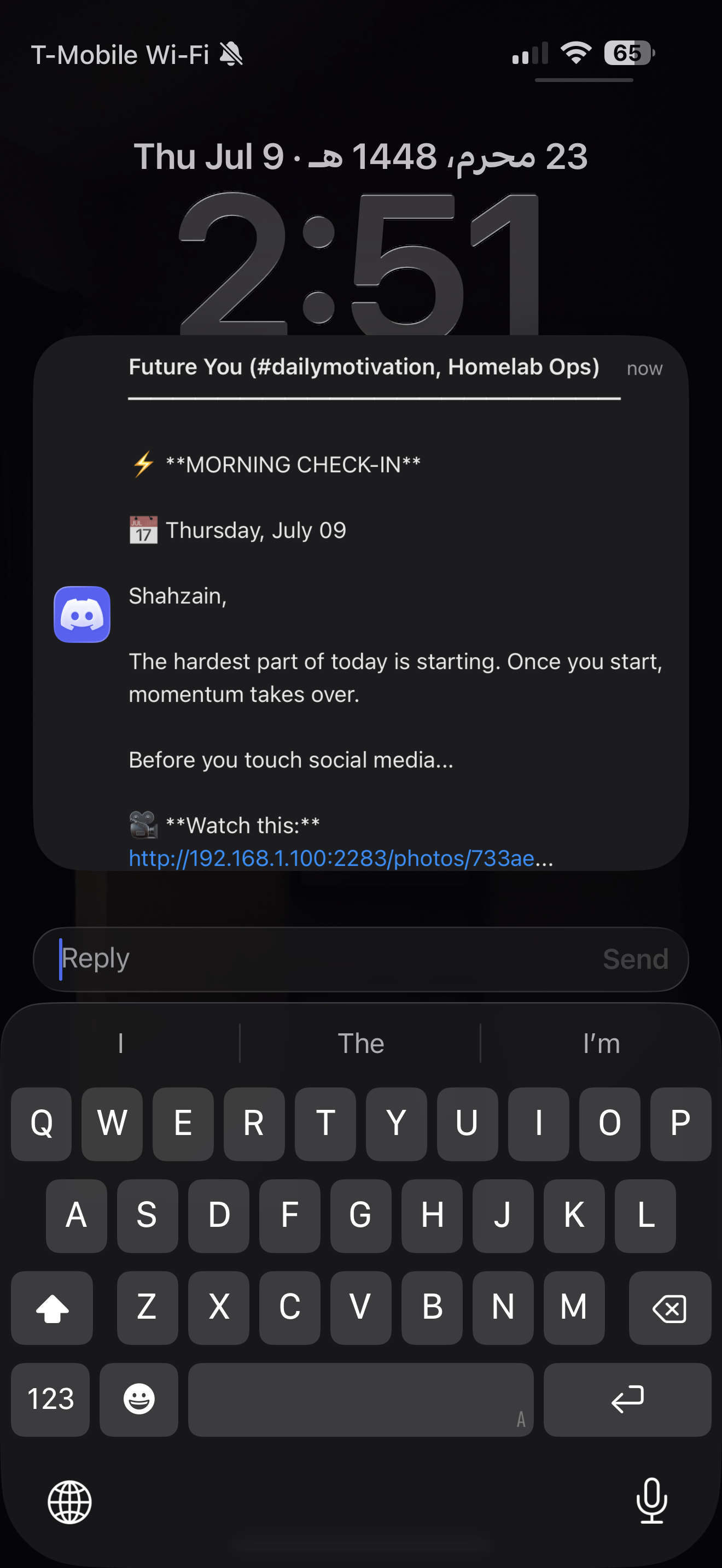
Automated morning check-in delivered through Discord.
Problem. I save motivational reels but rarely return to watch them.
What I built. A morning automation that sends me a random motivational quote, a random video from my Immich library, and my daily goals and reminders through Discord.
How it works
A Python script runs on my Raspberry Pi on a cron schedule. It puts together the morning message and delivers it to Discord. The Instagram walkthrough is linked below; source code and deeper implementation notes have not been linked here yet.
Where it runs
Raspberry Pi · Python · cron · Discord · Immich media library.
What I learned
Connect useful data from services already running at home, schedule a repeatable task, and make automation part of a routine instead of a one-off demo.